






My battle station used to look like a nest of cords. I learned how to organize gaming setup the painful way: tripping over a power strip and replacing a ruined controller.
It cost under $400 to get the desk tidy. Follow this guide and you’ll hide the mess, keep airflow, and make the whole space feel intentional.
Two quick context notes. I was aiming for modern minimal with warm wood and soft textiles, perfect for a studio or bedroom corner. Think around $300 to $700 to build from scratch, under $200 to refresh.
Also, I’ve noticed people in 2024 leaning toward natural textures paired with smart RGB accents. Storage-first approaches are trending, too, so this plan starts with structure and ends with mood.
1. Start with the Foundation: Desk, Scale, and Rug Anchor


Begin here because a tidy cable strategy needs a clear layout. Pick a desk sized for your monitors so cables don’t travel across the floor.
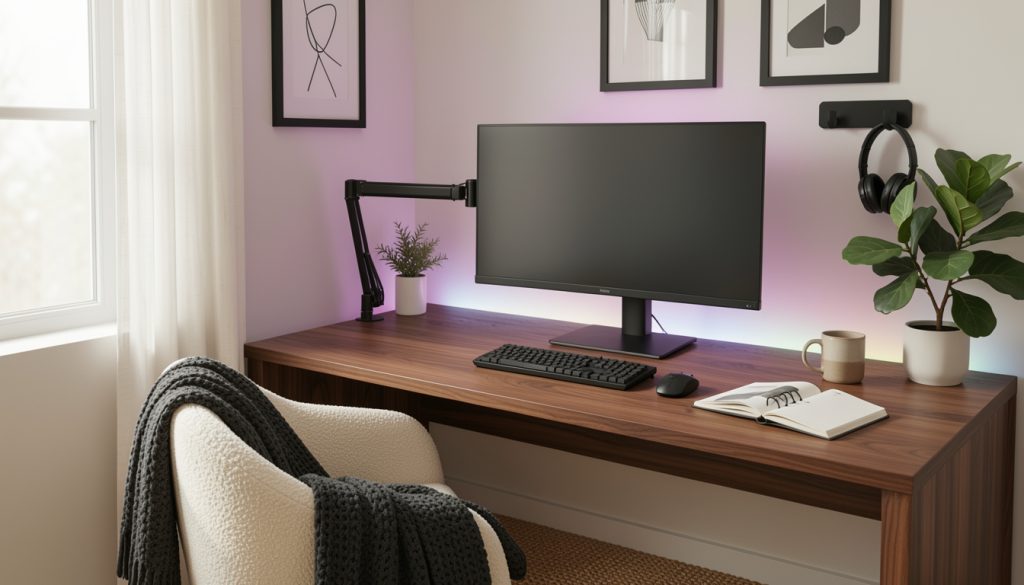
I used an L-shaped gaming desk 55 inch and mounted a heavy-duty monitor arm matte black to lift screens off the surface. Both reduce visible cables and free floor space.
Anchor the zone with a low-pile jute area rug 5×8. The rug grounds the setup and creates a visual border for cable runs.
Common mistake: choosing a desk too small. It makes cables spill over the edges. Instead, allow 6 to 12 inches of empty desk behind monitors for a cable channel and place the rug so the front legs of chairs sit fully on it.
2. Conceal and Route: Trays, Boxes, and Under-Desk Solutions


The trick is to move cables out of sight in layers. Start with an under-desk cable tray metal for power bricks and long cords.
Use a cable management box large on the tray to hide bulky adapters. Clip the surge strip to the tray, not the floor, with a surge protector power strip 10 ft.
Visual principle: keep heavy masses low and centered. That balances the visual weight of monitors above. Mistake people make is bundling everything with one zip tie so you can’t reroute later. Use velcro cable ties pack instead for flexibility.
3. Layer Texture and Function: Shelves, Storage, and Soft Goods


Add storage that looks curated. I mounted a floating walnut wall shelf 36 inch for a few display items and placed an open-back AV console oak below to house consoles.
Keep frequently used items visible but tidy with a mesh desk organizer set and a controller stand wood.
Principle: contrast textures to soften tech. Warm wood and linen throw pillows break the glare of screens. Common error: stuffing shelves with cables and gadgets. Instead, reserve one shelf for decor and one for tech, with cables routed down the back through a desk cable grommet black.
4. Set the Mood: Bias Lighting, Task Lamps, and Acoustic Comfort


Lighting hides cable clutter by shifting focus. I added a bias LED TV light strip RGB behind the monitor and a smart RGB floor lamp for ambient glow.
For desk tasks, a monitor light bar USB-C keeps the surface bright without more cords across the desk.
Acoustic panels reduce echo so games feel cleaner; try a noise-reducing acoustic panel 12×12. Mistake: chaining too many lights into visible plugs. Instead, route lamp cables into the tray and hide an inline smart plug inside the cable box.
Common Styling Mistakes to Avoid
Mistake: Letting power strips sit on the floor
Why it doesn't work: Makes the eye land on clutter and invites tangles.
Do this instead: Clip a surge protector power strip 10 ft to an under-desk tray out of sight.
Mistake: Hanging wall art too high above the desk
Why it doesn't work: Disconnects art from the workspace and makes the wall feel bare.
Do this instead: Center frames at eye level for sitting—use adjustable picture hanging strips for easy tweaks.
Mistake: Wrapping every cable with one permanent zip tie
Why it doesn't work: Stops quick swaps for new gear and hides cords in a tangled bundle.
Do this instead: Use velcro cable ties pack so you can reconfigure.
What You'll Need for This Look
Foundation Pieces
L-shaped gaming desk 55 inch around $120 to $350
Heavy-duty monitor arm matte black approx $35 to $120
Low-pile jute area rug 5×8 around $70 to $180
Textiles & Soft Goods
Boucle throw pillow 18×18 cream $20 to $45
Knit throw blanket 50×60 charcoal $25 to $60
Cream linen curtains 84 inch (price range $40 to $90)
Lighting
Bias LED TV light strip RGB $15 to $40
Monitor light bar USB-C approx $30 to $80
Finishing Touches
Floating walnut wall shelf 36 inch $30 to $120
Matte black gallery frame set 3 pack $25 to $60
Faux fiddle leaf fig 5 ft $40 to $120
Budget Swaps
Thrift or flea-market frames, similar look to Matte black gallery frame set 3 pack for less
Secondhand desk upgrade vs buying new L-shaped gaming desk 55 inch
Shopping Guide for This Look
Time purchases to sales: Score a monitor arm during Prime Day or Black Friday; check heavy-duty monitor arm matte black deals.
Thrift hack: Hunt frames and a console at local thrift stores, then match with a floating walnut wall shelf 36 inch.
2025 trend tip: Mix natural textures with subtle RGB; try a Bias LED TV light strip RGB for controlled color.
Splurge vs save: Splurge on a sturdy monitor arm, save on decor with thrifted vases and an Amazon ceramic vase terracotta small backup.
Conclusion
Start by clearing the floor and choosing the right desk; everything else becomes easier once the foundation is tidy. Keep one hidden power hub under the desk and soft textures on top to make tech feel lived-in.
Which cable clutter problem do you want solved first: under-desk routing, wall art placement, or lighting?